Free Normal Map Generator Online

Transform your textures into professional PBR maps in seconds. 100% free, browser-based, and completely private.

Normal Maps Displacement Maps Ambient Occlusion Specular Maps
Generate Normal Maps Now

No signup required. Your files never leave your browser.


>>
Batch Mode
Map Types
Size:
Strength
Level
Blur/Sharp
Filter
Invert
R G Height
Z Range
-1 to +1
Opacity %
<<
3D Preview(runs best on chrome)
Model Rotation
Maps Diffuse
Displacement
Normal AO Specular
Environment

Features

100% Private & Secure

All processing happens in your browser. Your images never leave your device—zero server uploads, complete privacy guaranteed.

Instant Results

Generate high-quality normal maps in real-time. No waiting, no queues—just drag, drop, and download.

Multiple Map Types

Generate Normal, Displacement, Ambient Occlusion, and Specular maps—all from a single height map or texture.

Real-Time 3D Preview

See your normal maps in action with our built-in 3D viewer. Test on cubes, spheres, planes, or your own .obj models.

Batch Processing

Process multiple textures at once. Perfect for game developers working with texture atlases or large asset libraries.

Multiple Export Formats

Export your maps in PNG, JPG, or TIFF format. Perfect for Unity, Unreal Engine, Blender, Maya, and any 3D software.

How It Works

1

Upload Your Texture

Drag and drop your height map or texture into the generator. Supports PNG, JPG, TGA, and more.

2

Adjust Settings

Fine-tune strength, level, blur/sharpness, and inversion options to get the perfect result.

3

Preview & Download

Check the 3D preview, then download your maps in PNG, JPG, or TIFF format.

Perfect For

Game Developers

Create PBR-ready textures for Unity, Unreal Engine, Godot, and other game engines.

3D Artists

Generate texture maps for Blender, Maya, 3ds Max, Cinema 4D, and other 3D software.

Indie Creators

Professional texture tools without the professional price tag—completely free forever.

Students & Educators

Learn and teach texture mapping concepts with an accessible, browser-based tool.

What is a Normal Map?

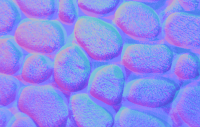
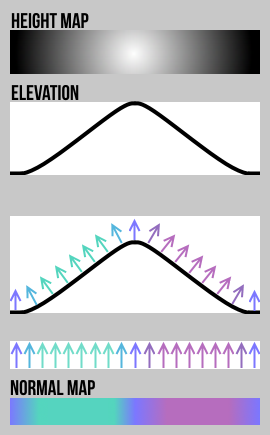
A normal map is a texture that stores surface orientation data, allowing 3D models to display intricate surface details without adding extra polygons. Each pixel in a normal map represents a direction vector encoded as RGB colors, simulating how light interacts with bumps, grooves, and fine details.

Normal maps are essential for PBR (Physically Based Rendering) workflows in modern game engines and 3D applications. They enable realistic lighting on low-poly models, dramatically improving visual quality while maintaining optimal performance.

Types of Maps You Can Generate

  • Normal Map: Simulates surface detail through light interaction—essential for realistic 3D rendering.
  • Displacement Map: Actually deforms geometry based on height data—ideal for close-up details and sculpted surfaces.
  • Ambient Occlusion (AO) Map: Adds soft shadows in creases and corners—enhances depth perception and realism.
  • Specular Map: Controls surface shininess and reflectivity—defines which areas appear glossy or matte.
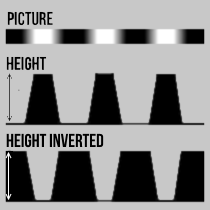
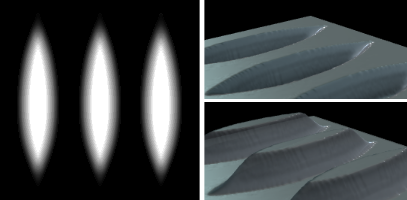
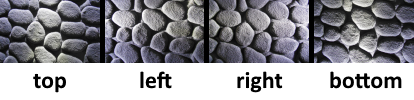
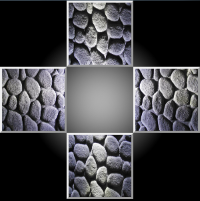
Normal Map explanation diagram showing height map to normal map conversion

Frequently Asked Questions

Is this tool really free?

Yes, 100% free with no limitations. No signup, no watermarks, no hidden fees. Generate as many maps as you need.

Are my images uploaded to a server?

No. All processing happens entirely in your browser using JavaScript and WebGL. Your images never leave your device—complete privacy guaranteed.

What file formats are supported?

Input: PNG, JPG, TGA, and most common image formats. Output: PNG, JPG (with quality control), and TIFF.

Can I use the generated maps commercially?

Absolutely. All maps you generate are yours to use however you want—personal projects, commercial games, client work, anything.

What's the maximum texture size?

There's no hard limit, but larger textures may be slower to process depending on your device. For best performance, use power-of-two dimensions (512, 1024, 2048, etc.).

Does it work on mobile?

The tool works best on desktop browsers (Chrome recommended) due to the intensive WebGL processing required for real-time 3D preview.

Ready to Create Your Normal Maps?

No downloads. No signups. Just professional texture maps in seconds.

Start Generating Now